
Visaro
Visaro is a first-party visitor insight and attribution plugin for WordPress that shows you exactly how people find your site, what they view, and where they drop off. Track campaigns with full UTM support, see session-based journeys, measure engagement, and spot outbound “leaks” on key pages. Filter visitors into meaningful segments, build audiences, and export clean CSV reports — so you can prioritise changes that improve enquiries and revenue.
Visaro SUITE
Visaro is now part of the Visaro Suite. Full details of Visaro Suite can be found on its own dedicated website.



KEY FEATURES
- First-party visitor tracking inside WordPress, so you can understand real behaviour on your own site without relying on third-party dashboards or guesswork.
- Session-based journey tracking that shows the path people take across pages, making it easy to spot what content builds confidence and where interest drops off.
- Full campaign tracking with UTM support (source, medium, campaign, term, content), so you can judge marketing performance based on the visitors it actually delivers, not just clicks.
- Flexible attribution views (first touch, last touch, blended) to help you report fairly across channels and understand what drives discovery versus what drives conversion.
- Outbound link click tracking that reveals where visitors leave your site, helping you find leaks, distractions, and missed opportunities on key pages.
- Engagement milestones (scroll depth and time-active signals) to show whether visitors are actually consuming content or simply bouncing, so you can prioritise the right fixes.
- Visitor filtering and saved segments so you can quickly isolate the visitors that matter (by campaign, behaviour, return visits and more) and repeat the same analysis over time.
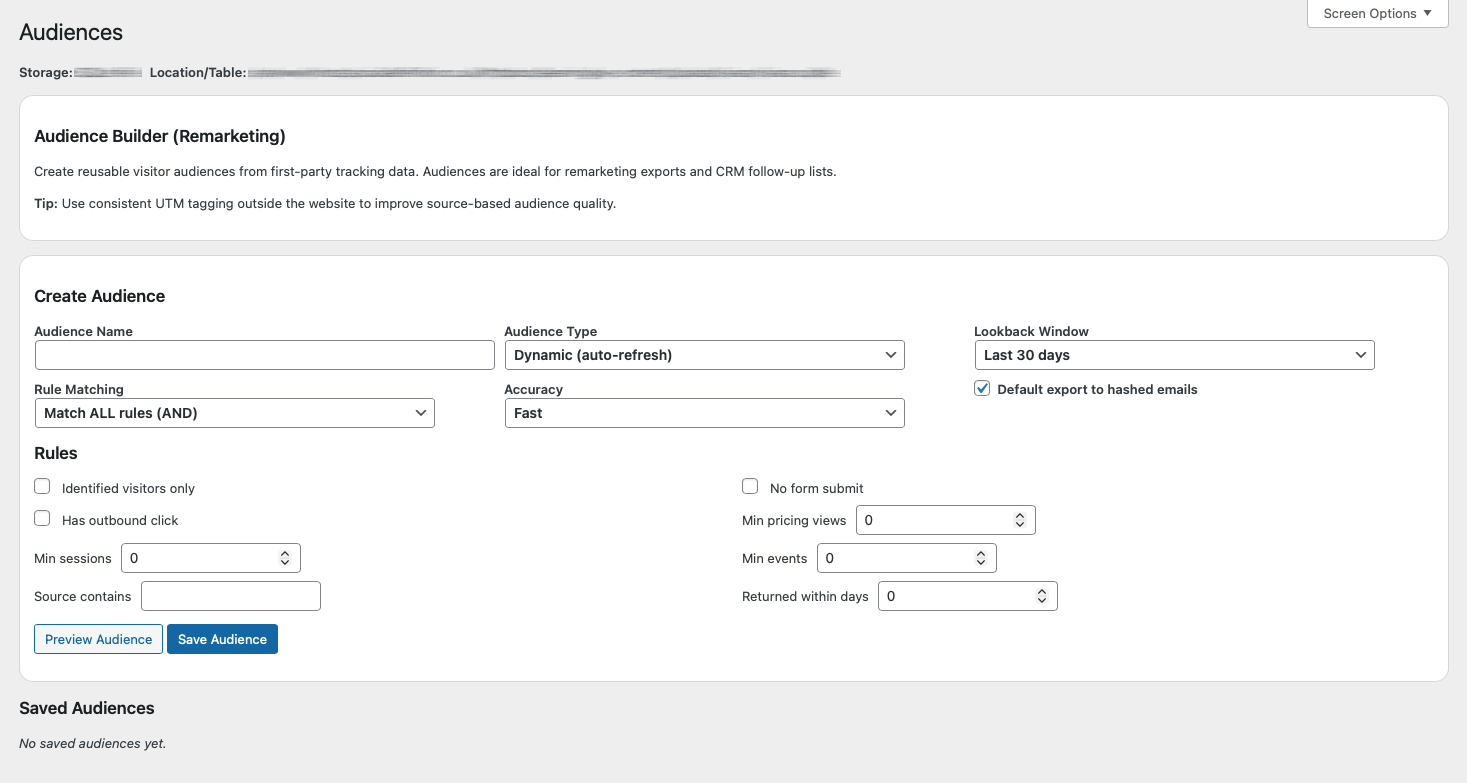
- Audience builder with CSV export, making it straightforward to share cohorts for reporting, follow-up, or internal workflows.
- Date-range CSV export of your visit data for client reporting, BI tools, and deeper analysis, without being locked into one platform’s view of performance.
- Practical governance controls (exclude internal traffic/bots, limit admin access, set retention), so your data stays clean, useful, and aligned with how you operate.
First-Party Tracking
Session Journey Tracking
UTM Campaign Insights
Flexible Attribution Models
Outbound Click Tracking
Engagement Milestones
Visitor Segmentation
Saved Segments
Audience Builder
CSV Data Export
Data Retention Controls
Internal Traffic Exclusion
The Benefits of Using Visaro

MARKETERS
- Validate campaign traffic quality, not only volume (compare sources against engagement and outbound activity).
- Identify where campaigns “leak” using outbound click events (which pages and sources send visitors off-site).
- Surface warm cohorts (identified email, repeat sessions, return within 7 days, pricing page without form) and export for follow-up workflows (subject to compliance).
- Compare attribution models (first-touch vs last-touch vs position-based) to explain reporting differences and channel contribution.
- Save named segments and reuse them as benchmarks (e.g., “Paid Social – UK – 2+ sessions”).

SEO
- Identify pages that attract traffic but underperform on engagement (possible intent mismatch, weak intro, poor clarity).
- Use referrer-derived search engine/query fields (where available) to spot expectation gaps between query intent and page delivery.
- Compare engagement signals before/after content and template changes as a consistent directional check.
- Separate ranking problems from UX/conversion problems using journey filters (e.g., pricing interest with no enquiry).
- Prioritise optimisation by exporting cohorts: focus on pages already attracting the right people but failing to move them forward.

DESIGNERS
- Use scroll depth as a hierarchy litmus test (if most never reach key sections, the page structure may be wrong).
- Detect “confusion” patterns: higher active time with low conversion often indicates friction, not lack of interest.
- Treat outbound clicks on conversion-focused pages as possible distraction/escape signals.
- Build redesign backlogs from journey filters (e.g., pricing visitors who don’t submit a form).
- Validate navigation/template changes using consistent milestone signals over time.
DEVELOPERS
- Instrument behaviour without relying on third-party scripts: outbound and engagement tracking is native and debuggable in WP.
- Validate which forms/plugins expose email fields in POST payloads (and therefore support passive identification).
- Manage footprint via exclusions, retention, and admin visibility settings.
- Reduce performance risk with safe range limits, caching TTL concepts, and controlled aggregation periods.
- Export via streamed CSV for BI tools, reporting pipelines, or internal analysis.
FAST SETUP
Fast setup means you can install the plugin and start capturing useful visitor data immediately, with no complex configuration or external dashboards to wire up.
Once it’s running, you can fine-tune what you track, exclude internal traffic, and apply filters to isolate the visitors and journeys that matter. From there, it’s easy to save segments for repeat reporting, build audiences for specific campaigns or behaviours, and export clean CSV files for analysis, client reporting, or internal workflows.
Purpose-Built Software
How Visaro Works
Visitors shows you the people behind the numbers. You can view session-based journeys, see what pages were visited and in what order, and quickly filter down by campaign, source, behaviour, returning visits, and other signals. This is where you spot patterns, validate assumptions, and identify the journeys that lead to enquiries versus the ones that stall.
Insights gives you the bigger picture. It rolls activity up into clear summaries and breakdowns so you can track trends over time, compare channels and campaigns, and understand what’s improving (or slipping) without having to export everything first. It’s ideal for regular reporting and performance reviews.
Campaigns focuses specifically on marketing activity. It uses UTM tagging and attribution views to show which campaigns are driving discovery, which are driving conversion, and which are simply generating visits without meaningful engagement.
Audiences helps you turn analysis into action. You can define and save reusable audience rules (for example, visitors from a specific campaign who returned within 7 days) and export those cohorts for reporting or internal workflows.
Export allows you to pull clean CSV data over a chosen date range, so you can run deeper analysis, feed dashboards, or produce client-ready reports whenever you need to.

FAQ
Does Visaro work with WordPress Multisite?
We’re exploring full Multisite support in a future release – if this is critical for your workflow, please get in touch so we can discuss timelines and potential workarounds.
How do I renew my licence?
What does “first-party tracking” mean, and does Visaro use cookies?
Visaro uses cookies to group activity into sessions and to preserve attribution over time, so you can see journeys and marketing influence across repeat visits. You can also control exclusions and retention, which helps keep your dataset clean and aligned with how you operate.