
Visaro
Visaro is a first-party visitor insight and attribution plugin for WordPress that shows you exactly how people find your site, what they view, and where they drop off. Track campaigns with full UTM support, see session-based journeys, measure engagement, and spot outbound “leaks” on key pages. Filter visitors into meaningful segments, build audiences, and export clean CSV reports — so you can prioritise changes that improve enquiries and revenue.
| Compatibility | WordPress 5.0 +, PHP 7.4 + |
|---|---|
| Prerequisites | MySQL |
From £79.00



KEY FEATURES
- First-party visitor tracking inside WordPress, so you can understand real behaviour on your own site without relying on third-party dashboards or guesswork.
- Session-based journey tracking that shows the path people take across pages, making it easy to spot what content builds confidence and where interest drops off.
- Full campaign tracking with UTM support (source, medium, campaign, term, content), so you can judge marketing performance based on the visitors it actually delivers, not just clicks.
- Flexible attribution views (first touch, last touch, blended) to help you report fairly across channels and understand what drives discovery versus what drives conversion.
- Outbound link click tracking that reveals where visitors leave your site, helping you find leaks, distractions, and missed opportunities on key pages.
- Engagement milestones (scroll depth and time-active signals) to show whether visitors are actually consuming content or simply bouncing, so you can prioritise the right fixes.
- Visitor filtering and saved segments so you can quickly isolate the visitors that matter (by campaign, behaviour, return visits and more) and repeat the same analysis over time.
- Audience builder with CSV export, making it straightforward to share cohorts for reporting, follow-up, or internal workflows.
- Date-range CSV export of your visit data for client reporting, BI tools, and deeper analysis, without being locked into one platform’s view of performance.
- Practical governance controls (exclude internal traffic/bots, limit admin access, set retention), so your data stays clean, useful, and aligned with how you operate.
First-Party Tracking
Session Journey Tracking
UTM Campaign Insights
Flexible Attribution Models
Outbound Click Tracking
Engagement Milestones
Visitor Segmentation
Saved Segments
Audience Builder
CSV Data Export
Data Retention Controls
Internal Traffic Exclusion
The Benefits of Using Visaro

MARKETERS
- Validate campaign traffic quality, not only volume (compare sources against engagement and outbound activity).
- Identify where campaigns “leak” using outbound click events (which pages and sources send visitors off-site).
- Surface warm cohorts (identified email, repeat sessions, return within 7 days, pricing page without form) and export for follow-up workflows (subject to compliance).
- Compare attribution models (first-touch vs last-touch vs position-based) to explain reporting differences and channel contribution.
- Save named segments and reuse them as benchmarks (e.g., “Paid Social – UK – 2+ sessions”).

SEO
- Identify pages that attract traffic but underperform on engagement (possible intent mismatch, weak intro, poor clarity).
- Use referrer-derived search engine/query fields (where available) to spot expectation gaps between query intent and page delivery.
- Compare engagement signals before/after content and template changes as a consistent directional check.
- Separate ranking problems from UX/conversion problems using journey filters (e.g., pricing interest with no enquiry).
- Prioritise optimisation by exporting cohorts: focus on pages already attracting the right people but failing to move them forward.

DESIGNERS
- Use scroll depth as a hierarchy litmus test (if most never reach key sections, the page structure may be wrong).
- Detect “confusion” patterns: higher active time with low conversion often indicates friction, not lack of interest.
- Treat outbound clicks on conversion-focused pages as possible distraction/escape signals.
- Build redesign backlogs from journey filters (e.g., pricing visitors who don’t submit a form).
- Validate navigation/template changes using consistent milestone signals over time.
DEVELOPERS
- Instrument behaviour without relying on third-party scripts: outbound and engagement tracking is native and debuggable in WP.
- Validate which forms/plugins expose email fields in POST payloads (and therefore support passive identification).
- Manage footprint via exclusions, retention, and admin visibility settings.
- Reduce performance risk with safe range limits, caching TTL concepts, and controlled aggregation periods.
- Export via streamed CSV for BI tools, reporting pipelines, or internal analysis.
FAST SETUP
Fast setup means you can install the plugin and start capturing useful visitor data immediately, with no complex configuration or external dashboards to wire up.
Once it’s running, you can fine-tune what you track, exclude internal traffic, and apply filters to isolate the visitors and journeys that matter. From there, it’s easy to save segments for repeat reporting, build audiences for specific campaigns or behaviours, and export clean CSV files for analysis, client reporting, or internal workflows.
Purpose-Built Software
Our software is built around practical working needs and everyday use. The aim is straightforward function, clear purpose and tools that fit naturally into real websites.
How Visaro Works
Visaro works through a set of focused admin windows, each designed to answer a specific type of question about your website performance and visitor behaviour.
Visitors shows you the people behind the numbers. You can view session-based journeys, see what pages were visited and in what order, and quickly filter down by campaign, source, behaviour, returning visits, and other signals. This is where you spot patterns, validate assumptions, and identify the journeys that lead to enquiries versus the ones that stall.
Insights gives you the bigger picture. It rolls activity up into clear summaries and breakdowns so you can track trends over time, compare channels and campaigns, and understand what’s improving (or slipping) without having to export everything first. It’s ideal for regular reporting and performance reviews.
Campaigns focuses specifically on marketing activity. It uses UTM tagging and attribution views to show which campaigns are driving discovery, which are driving conversion, and which are simply generating visits without meaningful engagement.
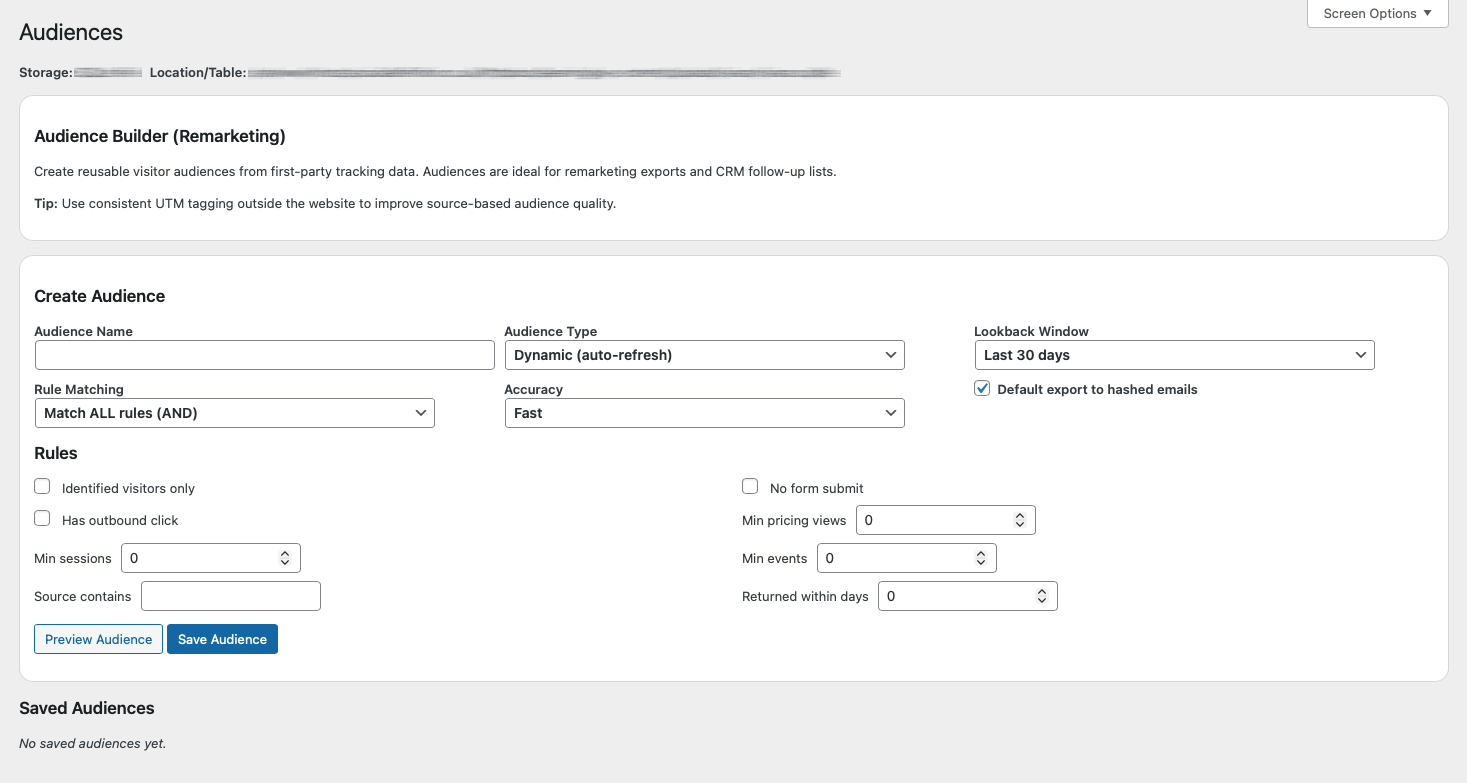
Audiences helps you turn analysis into action. You can define and save reusable audience rules (for example, visitors from a specific campaign who returned within 7 days) and export those cohorts for reporting or internal workflows.
Export allows you to pull clean CSV data over a chosen date range, so you can run deeper analysis, feed dashboards, or produce client-ready reports whenever you need to.

FAQ
Does Visaro work with WordPress Multisite?
Unfortunately, Visaro is designed for single-site WordPress installations only. It cannot be network-activated across a Multisite (network) setup. If you wish to work with multiple subsites, you’ll need to install and activate Visaro individually on each one.
We’re exploring full Multisite support in a future release – if this is critical for your workflow, please get in touch so we can discuss timelines and potential workarounds.
How do I renew my licence?
You’ll receive an email reminder 30 days before your licence expires, with a renewal link. Simply follow that link to renew for another year at your current rate. If you miss the reminder, you can also log in to your account dashboard on apps-and-plugins.co.uk and click Renew Licence next to Visaro.
What does “first-party tracking” mean, and does Visaro use cookies?
First-party tracking means the data is captured by your own website, within your own WordPress environment, rather than being collected primarily by an external advertising or analytics platform.
Visaro uses cookies to group activity into sessions and to preserve attribution over time, so you can see journeys and marketing influence across repeat visits. You can also control exclusions and retention, which helps keep your dataset clean and aligned with how you operate.
Will it slow down my website?
Visaro is designed to capture essential behavioural signals without adding heavy front-end scripts. Tracking is lightweight and focused on practical events such as sessions, journeys, outbound clicks, and optional engagement milestones. For reporting, Visaro includes filtering, sensible date ranges, and export options so you can analyse data without relying on expensive on-screen queries.
What can I export, and how do I use it?
You can export visit and event data over a chosen date range as a CSV file. This is useful for client reporting, internal performance reviews, deeper analysis in spreadsheets/BI tools, and creating consistent baselines (before and after a campaign, site change, or content update). You can also export audience-based cohorts when you want to report on specific segments rather than the whole site.
Can I filter down to just the visitors that matter?
Yes. Visaro includes visitor filtering and saved segments so you can isolate cohorts by campaign source/medium, behaviour, returning visits, engagement signals, and more. This lets you focus on meaningful groups (for example, visitors from a campaign who reached key pages but didn’t enquire), compare them over time, and export them for reporting or further investigation.
Single-Site Licence
£79
+VAT
Annually
Three-Site Licence
£199
+VAT
Annually
Ten-Site Licence
£399
+VAT